Optimizing Agent Memory
Optimizing Agent Memory: a quick guide to keeping your AI sharp
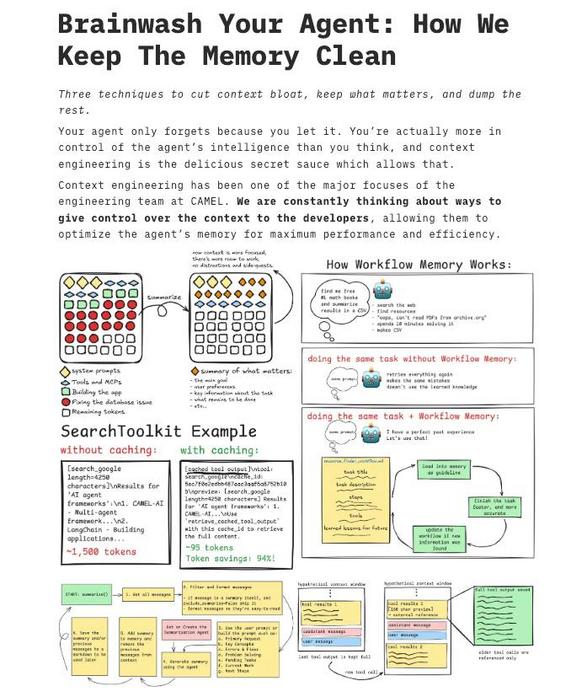
You’ve probably seen AI agents slow down or start acting oddly when their context gets bloated, right? That image I reviewed is a neat visual guide that walks through how to trim that fat, so your agent stays fast and focused. It shows a workflow memory system, examples of caching, and a clean layout that’s basically a cheat sheet for context engineering.
Here’s the idea, plain and simple. Memory isn’t just “more is better.” You want the right memory, at the right time. The diagrams in the image split memory into short-term workflow snippets and longer-term caches, with smart eviction policies. Practically, that means:
- Prioritize recent, relevant facts, dump or summarize older context.
- Cache “hot” data (things the agent uses a lot) and give it a TTL (time to live), so the cache doesn’t become a new source of bloat.
- Use summaries, not full transcripts, when you need history.
I’ve tried variations of this when building conversational tools, and small tweaks make a big diff. For example, replacing full conversation logs with rolling summaries reduced context size by over half while keeping responses accurate. Funny how less stuff can actually make the agent smarter.
Looking forward, memory systems will get more adaptive, learning what truly matters to each user. For now, start with simple rules: prioritize relevance, cache wisely, and summarize aggressively. Your agents will respond faster, cost less, and feel more coherent to real users. That’s progress, and it’s actually fun to watch unfold.
Optimierung des Agenten-Speichers: kurz, praktisch und menschlich
Wenn ein KI-Agent sich langsam oder ungenau anfühlt, liegt das oft an zu viel Kontext. Das Bild, das ich mir angesehen habe, zeigt übersichtlich, wie man solchen Kontext reduziert. Es illustriert Workflow-Memory, Cache-Beispiele und wie man den Speicher effizient kontrolliert.
Wichtig zu verstehen ist: Mehr Speicher bedeutet nicht automatisch bessere Ergebnisse. Stattdessen geht es darum, worauf sich der Agent konzentriert. Die Grafik trennt kurzzeitige, arbeitsbezogene Informationen von längerfristig gecachten Daten, und sie schlägt einfache Regeln vor, etwa Prioritäten und Ablaufzeiten.
Praxis-Tipps, die sich bei mir bewährt haben:
- Aktuelles zuerst: Behalte relevante, neue Fakten und fasse Altes zusammen.
- Cache nur das, was oft genutzt wird, und setze eine Ablaufzeit, damit der Cache nicht wieder aufbläht.
- Zusammenfassungen statt Rohtexte, damit die Historie handhabbar bleibt.
Ich habe das bei Chat-Tools ausprobiert, und kleine Änderungen führten zu deutlich besseren Antworten. Zusammenfassend: Weniger, aber gezielt, ist oft besser. Wenn Systeme künftig adaptiver werden, lernen sie, was wirklich relevant ist. Bis dahin: priorisieren, cachen, zusammenfassen, und du hast schon viel gewonnen.













Kommentar abschicken